




About RIME
RIME is a highly flexible input method engine designed for users who value customisation and control. The official website provides comprehensive documentation and resources for those who wish to explore its full capabilities.
Official website: https://rime.im/
After downloading RIME, you can manually configure the input method to achieve a high degree of freedom in customisation. This includes adjusting input schemas, keyboard layouts, punctuation handling, and various operational preferences to match your personal typing habits.
The diagram below illustrates the directory structure of various RIME configuration files. You may also refer to this tutorial: Embracing RIME Input Method from macOS to iPhone.
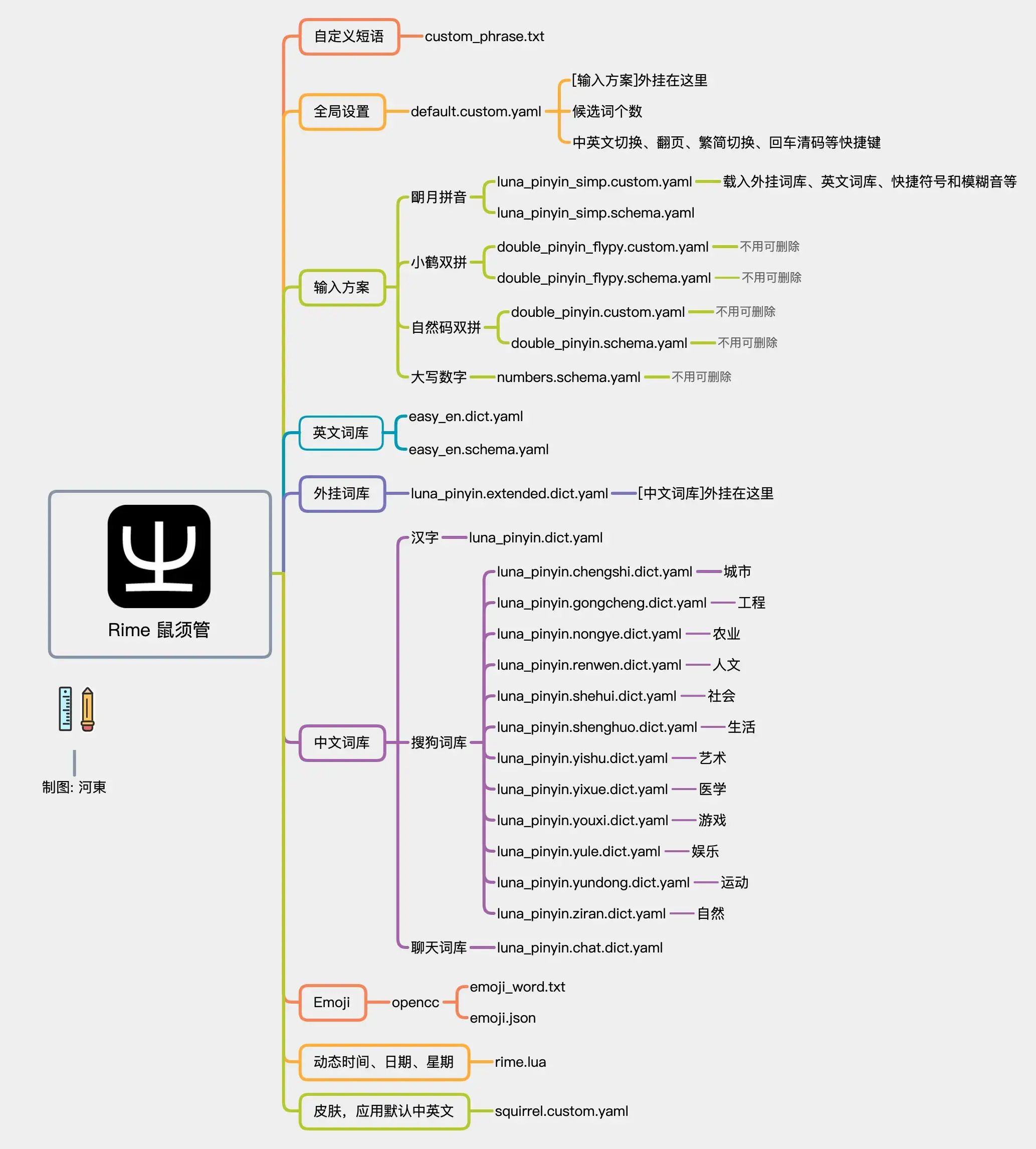
RIME Input Configurations
Pre-configured Settings
For those who prefer a ready-to-use setup, a pre-configured settings package is available for download. This configuration file includes optimised settings that can help you get started quickly without the need for extensive manual configuration.
Download: Pre-configured RIME Settings
This configuration is tailored to preferences. It features horizontal candidate display with 9 candidate options, maintains macOS's default Caps Lock behaviour for input method switching, and includes a convenient feature where pressing Shift or Caps Lock will preserve and confirm any English text that's already been typed when you forget to switch back to English input mode.